Alternatives

Filemorph, the offline alternative to iLovePDF
for iPhone, iPad and Mac

iLovePDF's web tools process your PDF on their servers and delete it within two hours. Filemorph processes it on your iPhone, iPad or Mac and never uploads it, which matters most for the documents people convert: contracts, statements, scans of IDs.

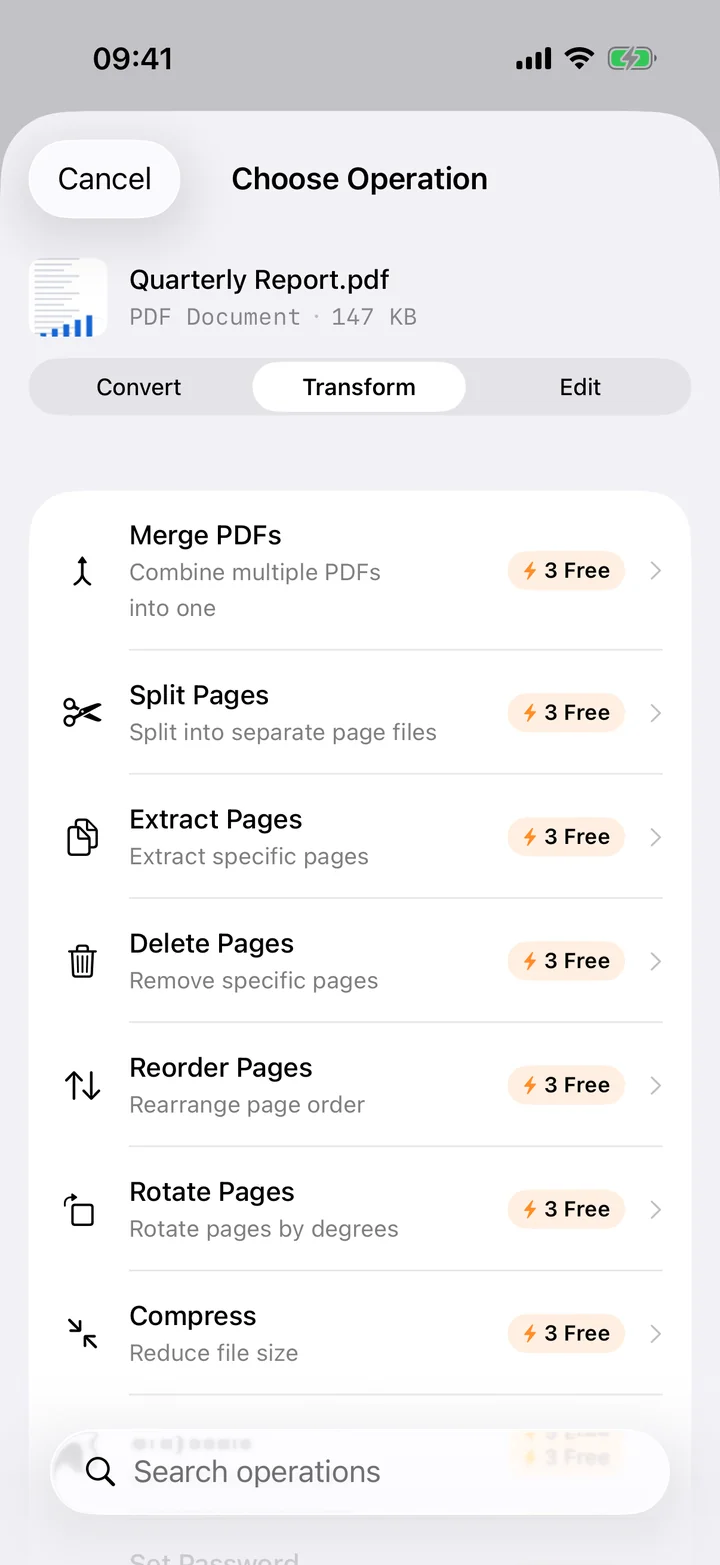
Filemorph's PDF tools on iPhone, merging and compressing on device

iLovePDF is a focused, well-built PDF suite with a highly rated iOS app. Its web version is an online service: files go to iLovePDF's servers in a region you choose, are processed there, and are deleted within two hours. Its desktop app runs locally. Its mobile app states that the scanner works on device; for its other tools, where processing happens is not stated on the pages we checked.

Filemorph is a general converter with a full PDF toolset inside it: merge, split, compress, rotate, reorder, OCR, password protection, PDF to Word, JPG or text, and more. Every one of those runs on the device, and the PDF toolset is part of Filemorph Pro.

Where they differ

Filemorph iLovePDF
Where processing happens On your device, for every PDF tool. Web: on iLovePDF's servers, in a processing region you choose. Desktop app: locally on your computer. Mobile app: the scanner works on device; other tools are not stated.
Works offline Yes. Every operation runs in Airplane Mode. Desktop app: yes. Web: no, it requires an internet connection. Mobile app: not stated for conversions.
How long files are kept Not applicable. Files never leave your device. Web files are deleted within a maximum of 2 hours. Signed documents are kept for up to 5 years.
File size limit None beyond the storage on your device. Caps without paying vary by tool: 15 MB for PDF to Word and Word to PDF, 25 MB for PDF to JPG, 40 MB for Image to PDF, 100 MB for Merge, 200 MB for Compress. Premium: 4 GB per task.
Formats 80+ input formats and 300+ operations, including a PDF toolset that covers merging, splitting, compressing, rotating, reordering, text recognition, protecting, unlocking, signing, and PDF to Word, Excel, JPG, PNG, text or Markdown. A PDF-specific toolset covering merging, splitting, compressing, converting, rotating, unlocking, watermarking, text recognition, editing and signing. No total count is stated.
Free tier All image format conversions and basic transforms, plus PDF text extraction. No account and no daily quota. Limited document processing and limited batch processing. No daily number is stated on their pricing page.
Price Pro at $0.99 per week, $3.99 per month or $29.99 per year, with a 7-day trial on monthly and annual. Pro covers the PDF toolset plus video, audio and AI tools. Premium at 4 US$ per month billed annually (48 US$ per year) or 7 US$ billed monthly on the web. In the iOS app: $5.49 per month or $44.99 per year.
Platforms iPhone, iPad and Mac, from the App Store. Web, iOS, Android, Mac and Windows. The App Store listing covers iPhone, iPad, Mac and Apple Vision.
Account required No. Not stated on their site for basic use.
App Store privacy label Data Not Collected. Data Linked to You: email address and user ID. Data Not Linked to You: name, device ID, product interaction, crash and performance data.

Facts about iLovePDF were taken from its own website or App Store listing on 29 August 2026 and may have changed since. Where its pages disagree with each other, both figures are given.

iLovePDF is a trademark of its owner. Filemorph is not affiliated with or endorsed by iLovePDF.

When iLovePDF is the better choice

Switching from iLovePDF: the same jobs in Filemorph

The iLovePDF tools people reach for most, each done on device in Filemorph.

FAQ

iLovePDF vs Filemorph: common questions.

Does Filemorph upload my PDF like iLovePDF's web tools? +

No. Merge, split, compress, OCR, protect and convert all run on your iPhone, iPad or Mac. There is no server in the path and the tools work in Airplane Mode. iLovePDF's web tools process files on its servers and delete them within two hours.

Which Filemorph tools are included without paying? +

Image format conversions, basic transforms such as resize and crop, PDF text extraction, metadata viewing and stripping, and file checksums. The PDF toolset (merge, split, compress, OCR, protect, convert) is part of Filemorph Pro.

How does Filemorph Pro compare with iLovePDF Premium on price? +

Filemorph Pro is $0.99 per week, $3.99 per month or $29.99 per year, with a 7-day trial on the monthly and annual plans, and covers video, audio, image and AI tools as well as PDF. iLovePDF Premium is 4 US$ per month billed annually (48 US$ per year) or 7 US$ monthly on the web, and $5.49 per month or $44.99 per year through the iOS app.

Can Filemorph sign or edit PDFs? +

Filemorph can sign, annotate, stamp, watermark, redact, fill forms, reorder and crop pages, and add page numbers, all on device. It does not offer a hosted e-signature workflow, PDF translation or in-place text editing; iLovePDF does.

Does Filemorph's iOS app process files on device for every tool? +

Yes, for every conversion and PDF tool. The one network request the app makes on its own is an optional download of AI enhancement models on first use; your files are never part of it. iLovePDF's mobile pages state on-device processing for its scanner and do not state where its other tools process files.

Your PDFs, processed on your device.
Filemorph, on the App Store.

On-device, no upload, works in Airplane Mode. 300+ file operations for iPhone, iPad and Mac.

Download on theApp Store