Image tools

Every image format.
Edited on-device.

Convert HEIC to JPG, resize for any platform, compress for the web, edit in real time, and run AI-powered enhancements — entirely on your iPhone. 80+ image operations spanning format conversion, transforms, filters, AI and professional presets.

82 operations 13 input formats Free + Pro
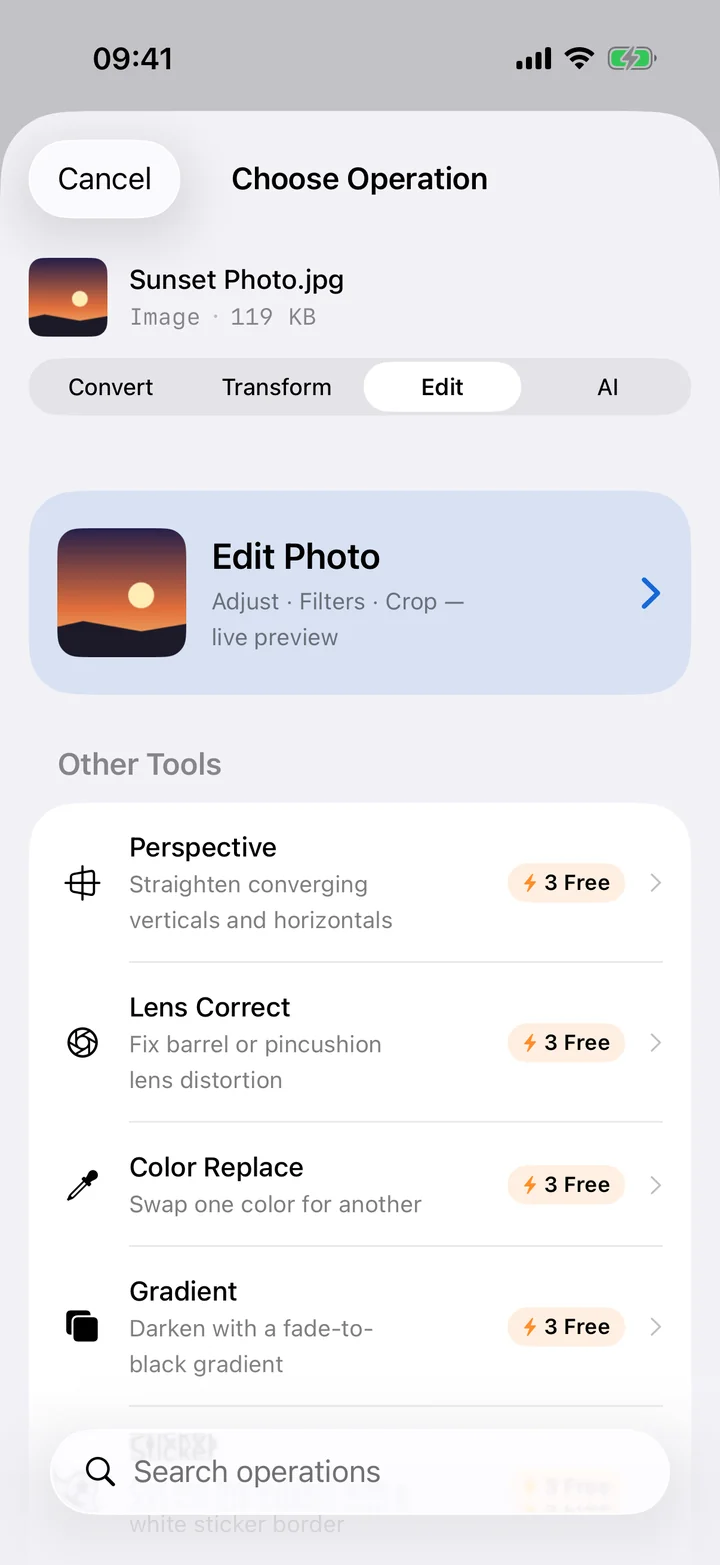
Filemorph image editor on iPhone

Format conversion

10+ formats Convert between every common image format

HEIC → JPG

Free

Convert iPhone HEIC photos to universally compatible JPEG.

HEIC → PNG

Free

Lossless conversion of HEIC to PNG for web and design.

PNG ↔ JPG

Free

Two-way conversion with quality and compression control.

JPG → WebP

Free

Modern web format with 25–35% smaller file size.

HEIF → AVIF

Free

Next-gen AV1-based format for the smallest possible images.

SVG rasterize

Free

Render SVG to PNG at any DPI — perfect for icon export.

RAW → JPG

Free

Open RAW files from Canon, Nikon, Sony, Fuji and more.

PSD → PNG

Free

Flatten and export Photoshop files to PNG or JPEG.

AI / EPS → PDF

Pro

Extract embedded PDF from Adobe Illustrator and EPS.

TIFF, BMP, GIF, ICO

Free

Full support for legacy and specialty formats.

Color profile convert

Pro

Switch between sRGB, Display P3 and Adobe RGB.

HDR → SDR tone map

Pro

Convert HDR photos to standard dynamic range cleanly.
Transform & resize

5 operations Geometry and dimension changes

Resize

Free

Resize by exact dimensions or percentage, with smart resampling.

Crop

Free

Crop to region or aspect ratio — 1:1, 4:3, 16:9 and custom.

Rotate

Free

Rotate by 90° increments or arbitrary angle with anti-alias.

Flip / Flop

Free

Mirror vertically or horizontally.

Perspective correct

Pro

Fix keystone distortion in document or building photos.

Compress & optimize

8 operations Smaller files, same quality

Smart compress

Free

Intelligent compression that picks the best format and quality.

Quality adjust

Free

Manual JPEG/HEIC/WebP quality control with live preview.

Progressive JPEG

Free

Encode as progressive for faster web loading.

Strip metadata

Free

Remove EXIF, GPS and color profile data in one tap.

Image sanitize

Pro

Strip all metadata and re-encode as a clean JPEG.

Lens correction

Pro

Fix barrel and pincushion distortion from wide lenses.

Change DPI

Pro

Set print resolution metadata for accurate output size.

Noise reduction

Free

Reduce sensor noise while preserving detail.

Filters & effects

14 effects Core Image-powered adjustments

Brightness

Free

Adjust exposure across shadows, midtones and highlights.

Saturation

Free

Boost or mute color intensity.

Hue shift

Free

Rotate the color wheel by any angle.

Color temperature

Free

Warm or cool the image with white-balance control.

Blur

Free

Gaussian blur with adjustable radius.

Sharpen

Free

Unsharp mask for crisp details.

Sepia

Free

Classic warm-tone vintage effect.

Monochrome / B&W

Free

Convert to grayscale with optional tint.

Negative

Free

Invert all colors.

Pixelate

Free

Mosaic pixelation with adjustable block size.

Oil paint

Free

Painterly artistic effect.

Vignette

Free

Darken edges for a focused look.

Color replace / shift

Pro

Swap one color for another across the image.

Gradient overlay

Pro

Apply gradient with blend mode for stylized looks.

Overlays & decoration

8 operations Borders, frames, watermarks

Watermark

Pro

Add text or image watermark with opacity and position control.

Border

Free

Add a configurable border with color and width.

Rounded corners

Free

Smooth corner rounding with custom radius.

Circle mask

Free

Crop to a circle — great for avatars.

Drop shadow

Pro

Add realistic drop shadow with blur and offset.

Polaroid frame

Pro

Classic instant-photo frame with caption space.

Torn edges

Pro

Ripped paper edge effect.

Collage

Pro

Combine multiple images into a single layout.

AI & Vision

7 operations Apple Vision & Core ML

Background remove

Pro

AI-powered subject isolation with transparent background.

AI upscale

Pro

Super-resolution upscaling using Core ML models.

Smart crop

Pro

Content-aware crop that keeps the subject centered.

Face crop

Pro

Detect faces and crop tightly around them.

Face blur

Pro

Auto-detect and blur every face in a photo.

Face pixelate

Pro

Auto-detect and pixelate faces for anonymization.

Red-eye removal

Pro

Remove red-eye artifacts from flash photos.

Enhance & restore

9 operations Core Image & Core ML enhancement

Auto enhance

Free

One-tap automatic adjustment using Core Image.

Fix dark photos

Free

Recover underexposed images with shadow lift.

Fix noise

Free

Targeted denoising for low-light shots.

Fix color tint

Free

Auto white-balance correction.

Vivid boost

Free

Make colors pop without over-saturating.

Smart sharpen

Free

Edge-aware sharpening that avoids halos.

AI super-resolution

Pro

Up to 4× upscale using ML models on Neural Engine.

AI restore

Pro

Restore old/damaged photos with InstructIR.

Colorize B&W

Pro

Bring black-and-white photos to life with DDColor.

Presets & automation

6 operations Common workflows in one tap

Social media preset

Pro

One-tap resize for Instagram, Facebook, Twitter, YouTube and more.

App icon set

Pro

Generate complete Xcode AppIcon.appiconset as a ZIP.

Web favicon

Pro

Generate full favicon set including .ico and PNGs.

Contact sheet

Pro

Create a thumbnail grid of multiple images.

Split grid

Pro

Slice into a grid for Instagram carousel posts.

Panorama split

Pro

Split a panorama into Instagram-ready segments.

Creative & pro tools

12 operations Specialty workflows

Sticker maker

Pro

Cut out subject and add a sticker-style outline.

Passport photo

Pro

Crop and size to official passport/ID standards.

Color palette extract

Pro

Extract dominant colors as JSON for design use.

Image diff

Pro

Compare two images and visualize the differences.

Stitch screenshots

Pro

Join screenshots vertically/horizontally with overlap detection.

Text → image

Pro

Render any text as a styled image.

Animated WebP

Pro

Create animated WebP from an image sequence.

Animated PNG (APNG)

Pro

Lossless animated PNG with full transparency.

Partial blur

Pro

Blur a region you draw (great for redacting screenshots).

Partial pixelate

Pro

Pixelate a region you draw.

Base64 encode/decode

Free

Encode an image as Base64 data URI or decode back.

GIF from images

Pro

Make an animated GIF from an image sequence.

Image editor

20 live tools Real-time editing canvas

Live preview

Free

Every adjustment renders in real time as you drag.

Undo & redo

Free

Full operation stack history with one-tap undo.

Before / after slider

Free

Drag to compare your edits against the original.

Real-time histogram

Free

Live RGB histogram while you adjust exposure.

Zoom & pan

Free

Pinch to zoom, two-finger pan around the canvas.

Operation stacking

Free

Layer multiple effects and tweak each one.

Crop overlay

Free

Drag handles with aspect ratio presets.

Rotation dial

Free

Precise straightening with degree dial.

Quick conversions

The most-searched image format pairs — tap any to learn more.

HEICJPG HEICPNG PNGJPG JPGWebP PNGPDF SVGPNG RAWJPG PSDPNG
FAQ

Image tools — common questions.

How do I convert HEIC to JPG on iPhone? +

Open the HEIC file in Filemorph (via Files, Photos or the Share sheet), tap Convert, choose JPEG, and save. The conversion runs locally on your device with no upload.

Can Filemorph remove image backgrounds? +

Yes. Background removal uses Apple's Vision framework and runs entirely on-device. Tap the AI & Vision section in the image editor.

Does it support RAW photos? +

Yes. RAW files from major camera brands (Canon, Nikon, Sony, Fuji and more) can be opened and converted to JPEG, PNG, HEIC, TIFF, WebP and AVIF.

How does AI upscale work? +

Filemorph uses Core ML super-resolution models (DRCT, RealESRGAN) running on the Neural Engine. The model downloads once, then all upscaling happens offline.

Will my photo metadata be stripped automatically? +

Only if you ask. By default Filemorph preserves metadata. Use the Strip metadata tool or the privacy preset to remove EXIF, GPS and authorship in one tap.

Get the full image toolkit.
Free on the App Store.

82 image operations. Real-time editor. Zero uploads.

Download on theApp Store